ACY Connect
Institutional FIX API Platform
Developer-facing institutional infrastructure. A misconfigured FIX message doesn't throw a user-facing error — it produces a million-dollar position sizing error, silently, while the market moves. Designed the documentation system, credential management, and onboarding flows that made integration unambiguous.

ACY Connect Platform. Global Institutional Connectivity Infrastructure
The design problem: make a technically unforgiving API accessible to institutional developers without sacrificing depth. This is structurally identical to Stripe's API docs, Bloomberg's B-PIPE SDK, or Plaid's developer portal — different protocol, same constraint: reduce time from credential receipt to first successful transaction, without ambiguity.
- FIX session state machine — annotated sequence diagrams
- Tag 150/39 conflict docs — one wrong value = fill error
- Reject scenario matrix across 4 error types
- Anti-pattern warnings preventing gateway overload
- 67% support ticket reduction · 3→1 week integration time
- Stripe — payment intent state machine, error taxonomy
- Bloomberg B-PIPE — field precision, corrupted risk if wrong
- Twilio — voice/SMS state flows, anti-pattern guidance
- Plaid — credential provisioning, progressive disclosure
- Same design problem. Different protocol.
✅ Live production infrastructure since 2025. 12+ institutional clients — hedge funds, prime brokers, prop desks. Documentation live at fix-api-docs.acyconnect.com. I served as Visual & Information Architect alongside Tech Lead and QA — they owned protocol logic, I owned developer experience: documentation architecture, credential flows, and systematizing engineering specs into navigable institutional documentation.
Platform Design: Institutional User Flows
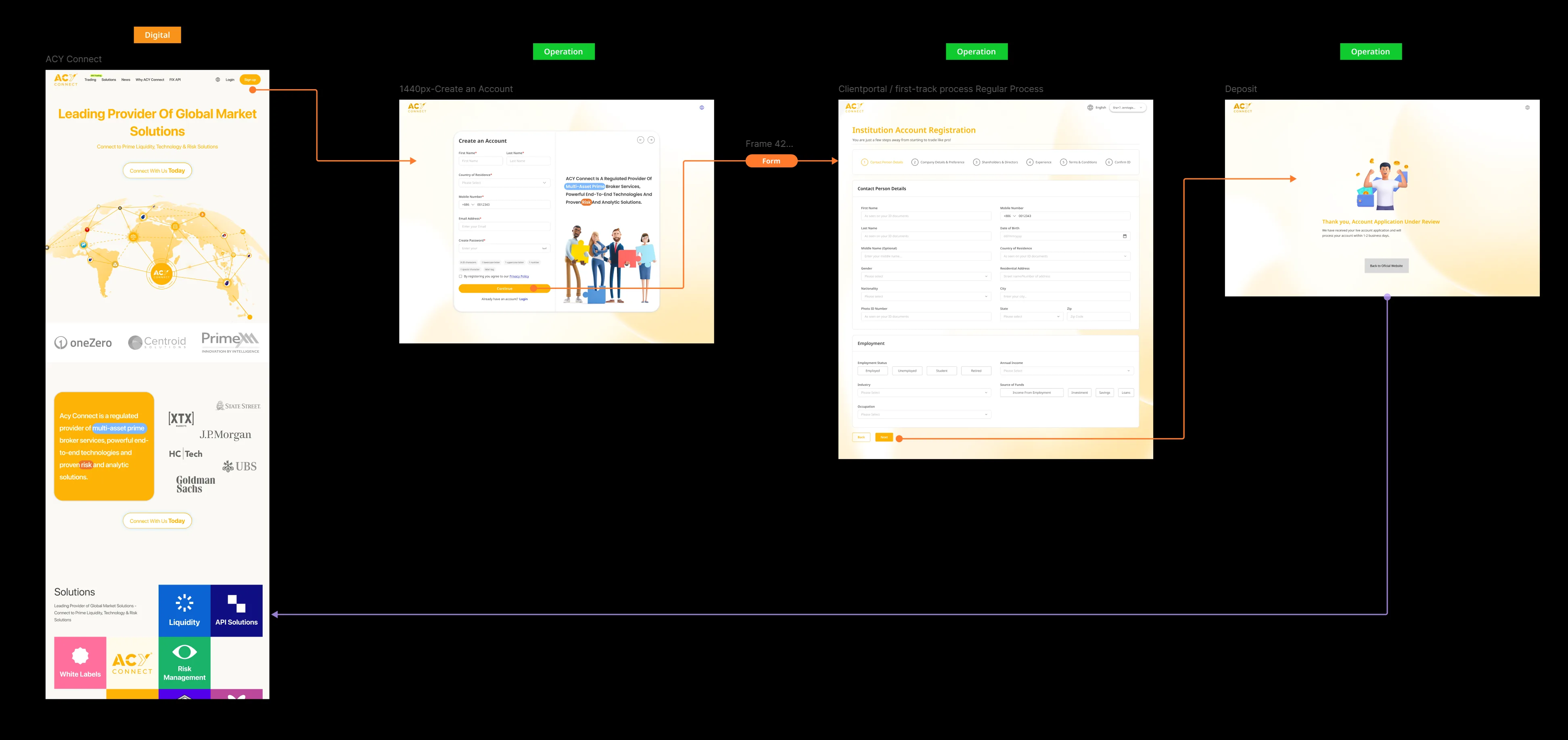
Beyond the FIX API documentation, ACY Connect is a full institutional platform — covering the public marketing site, client onboarding, compliance review, and an internal operations portal for Relationship Managers. My role was to map these workflows, define the information architecture, and design the screens. The technical specifications behind each form field came from the Tech Lead and QA team; my job was to make complex institutional processes navigable.
Institutional Onboarding Journey
KYC Review Dashboard + API Credential Setup
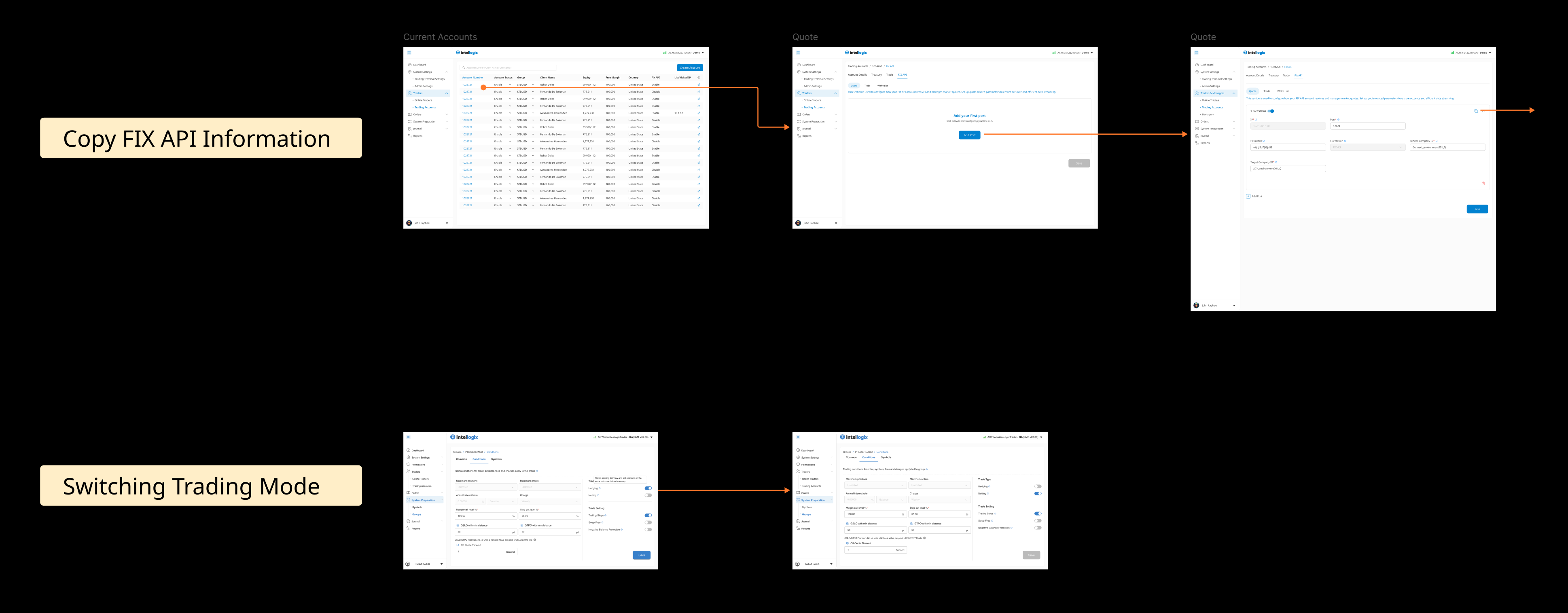
The RM reviews incoming institutional applications and makes an approval decision. Two clear outcomes — Activate or Reject — each triggering an automated email to the client. The design challenge was giving RMs enough information to decide confidently without overwhelming the interface with compliance detail.
Previously, setting up API access required an email chain with the ops team. I designed a self-service flow: accounts list → empty state with a clear first-action CTA → configuration form. The empty state is intentional — it removes anxiety for first-time setup and guides the RM step by step.
Quote API Setup + IP Whitelist Management
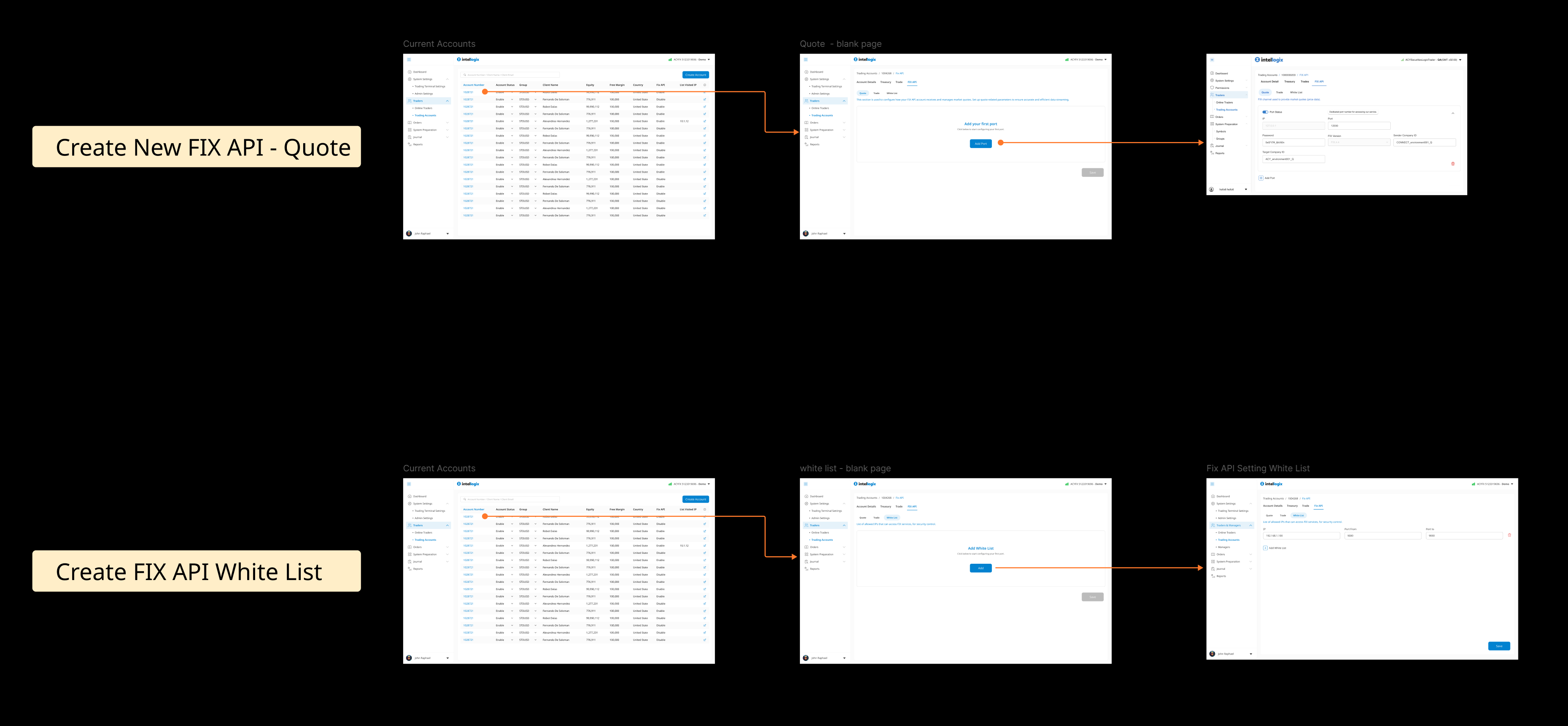
Design decision — consistent patterns across connection types: Quote API, Trade API, and IP Whitelist are three distinct technical functions — but the RM managing them isn't a developer. I unified all three under the same 3-step pattern (list → empty state → form) so that once an RM learns one flow, the others feel immediately familiar. Reducing the cognitive overhead of tool-switching was the primary UX goal here.
Credential Retrieval + Account Configuration
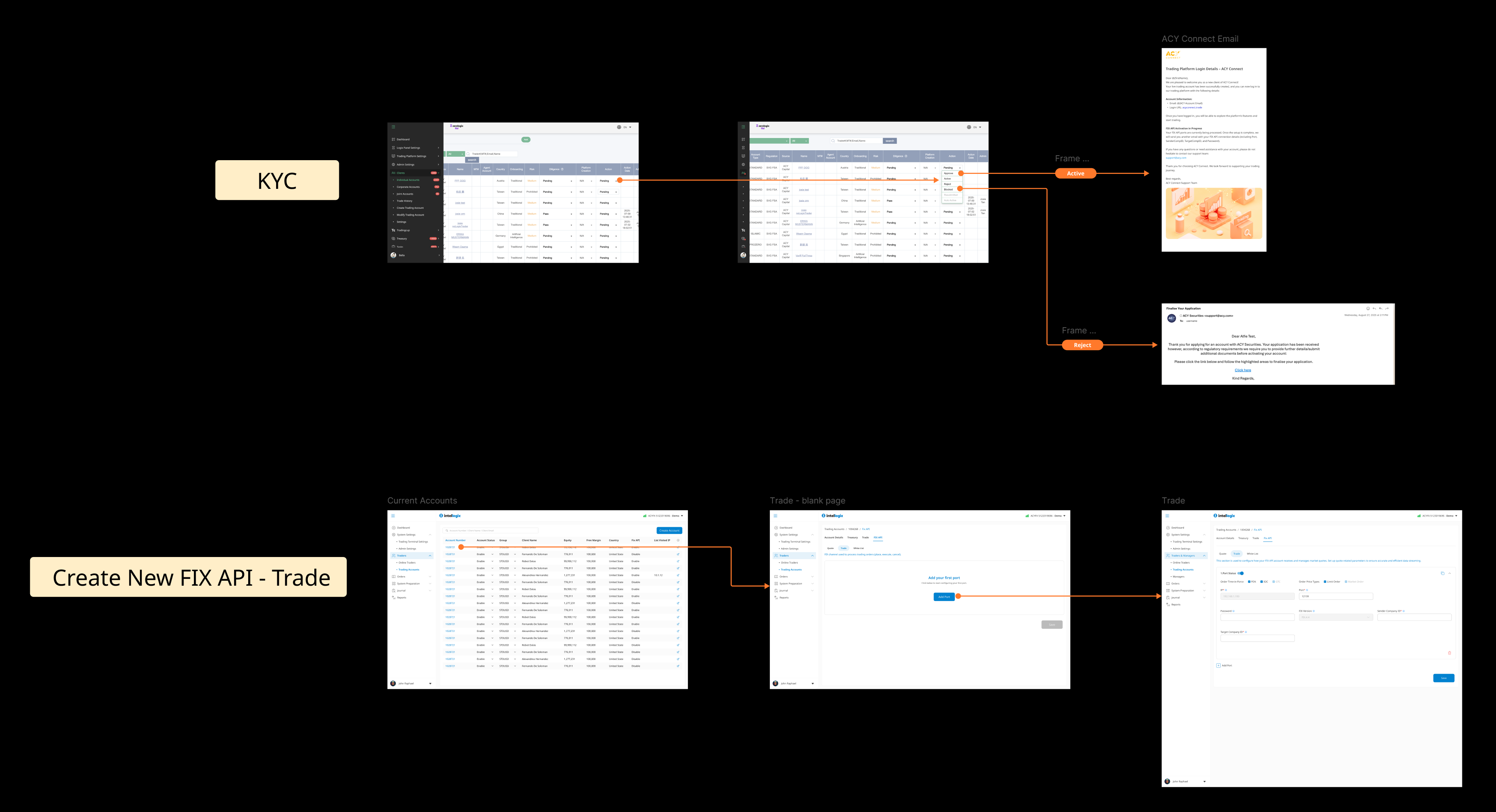
When a client's developer needs connection details, the RM retrieves them directly from the portal — no IT ticket, no waiting. All relevant credentials grouped on one screen with copy actions. The design reduces a task that previously took days to under a minute.
Account-level trading settings that affect how client positions are managed. The challenge was that the difference between modes is highly technical — my approach was a before/after comparison layout so the RM can see the effect of each choice without needing to understand the underlying mechanics.
The Documentation System
The answer to the integration problem wasn't a document — it was a documentation system. A structured information architecture with explicit design rules governing how five distinct user types, each entering the integration journey at a different stage of technical depth, find exactly what they need without filtering through content that doesn't apply to them.
| User Type | Enters At | Information They Need | Success State |
|---|---|---|---|
| PM / BD | Introduction | Capability overview — what ACY Connect does, who it's for | Evaluation decision made |
| DevOps / Infra | Credentials & Verification | IP, Port, SenderCompID, TargetCompID — no protocol depth required | Network connection verified via Telnet |
| FIX Engine Dev | Session Messages | State machine, Logon 35=A / Heartbeat 35=0 / TestRequest flows | FIX session established and stable |
| Quant Developer | Trading Messages | Tag 39/150 state mapping, partial fill lifecycle, cancel/reject flows | First live trade executed correctly |
| Market Data Eng | Quoting Messages | MarketDataRequest lifecycle, single-symbol rule, unsubscribe flows | Live price feed streaming without gateway overload |
loop [ ]
Loop annotation = recurring sequence. Prevents treating heartbeat as a one-time event.
alt [ ]
Alt conditional = error-handling path. Shows what happens when the happy path fails.
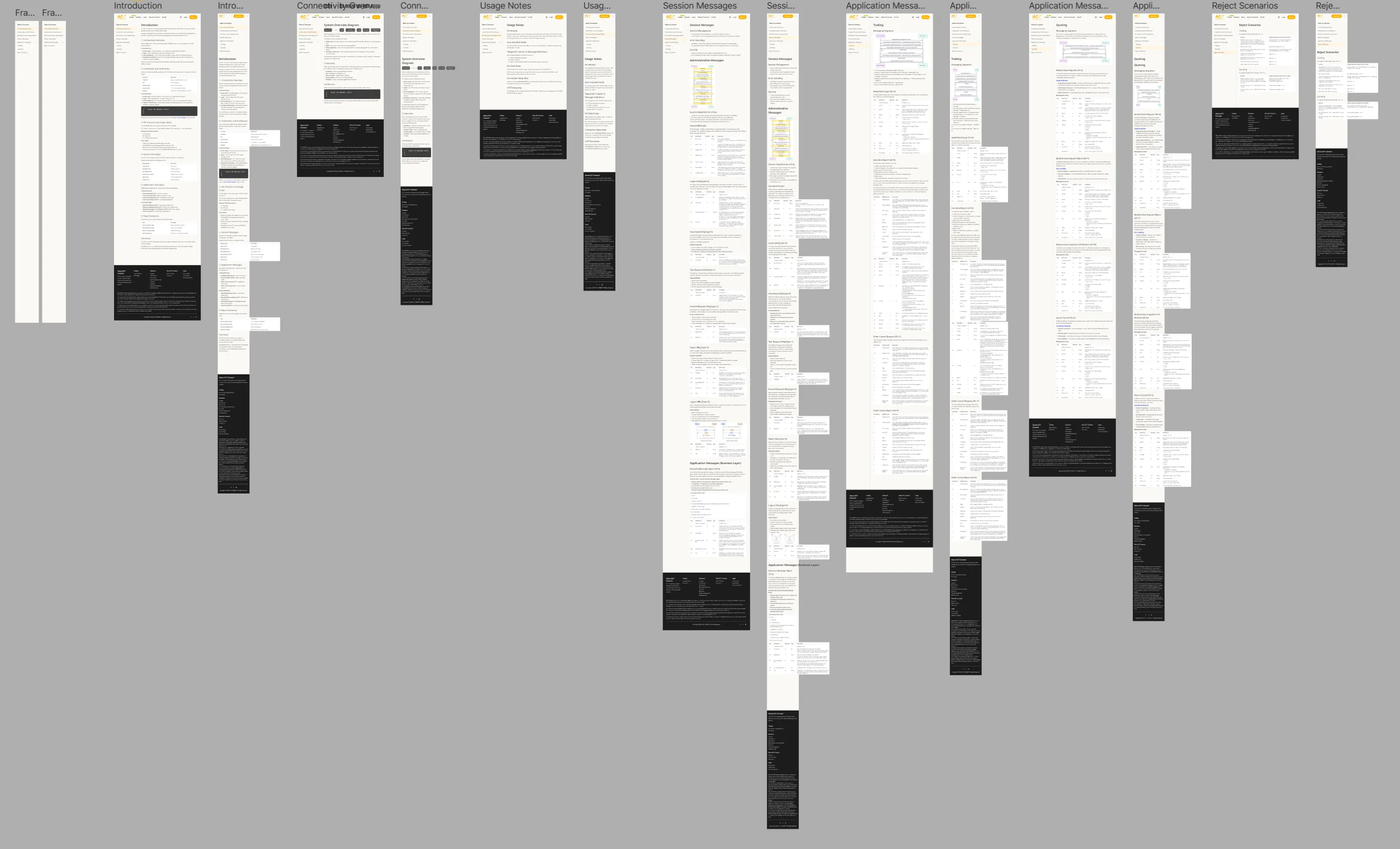
Figma workspace — all 7 documentation pages in one file. Shared layout rules, consistent visual grammar, designed as a single coherent system. Structural decisions made once, applied across every page.
1. The Design Constraint: Why FIX Documentation Can't Afford Ambiguity
There's no error message. There's just a wrong trade.
FIX Protocol is machine-to-machine. When a hedge fund's algorithm sends a $50M order, there's no UI, no validation toast, no undo. A misread Tag 39 OrdStatus — one field in one message — and the system double-counts a fill, or assumes an order is open when it's been cancelled. The position is wrong before anyone notices.
That constraint defined every design decision in this documentation system. There is no tolerance for "probably fine." The user isn't browsing — they're implementing production infrastructure. The documentation either gives them exactly what they need, or they ship a bug into a live trading system.
My job wasn't to explain FIX. It was to make a technically unforgiving protocol legible to five different user types — each entering the integration journey with a completely different mental model and a completely different definition of "done."
Who Was I Designing For?
Prime Brokers
Aggregating liquidity from multiple providers simultaneously. They care about routing logic, not onboarding — they need the credential and session pages to be frictionless so their ops team can get off the phone.
Hedge Funds
Quant developers implementing algorithmic strategies. They read Tag 39/150 state tables like source code. My job was to make those tables scannable, not explain what they mean.
Proprietary Trading Firms
Infrastructure engineers setting up low-latency connections. They need the verification section — Telnet command, port, SenderCompID — and nothing else. Every extra paragraph costs them attention they don't have.
2. Information Architecture: How the System Is Structured
Each of the seven pages is designed around a specific user at a specific moment in their integration journey — not a reading sequence, but an entry-point system. A DevOps engineer setting up network access never needs to open Trading Messages. A quant developer implementing order execution skips Credentials entirely. The architecture is designed so that every user lands in the right layer, at the right depth, without filtering.
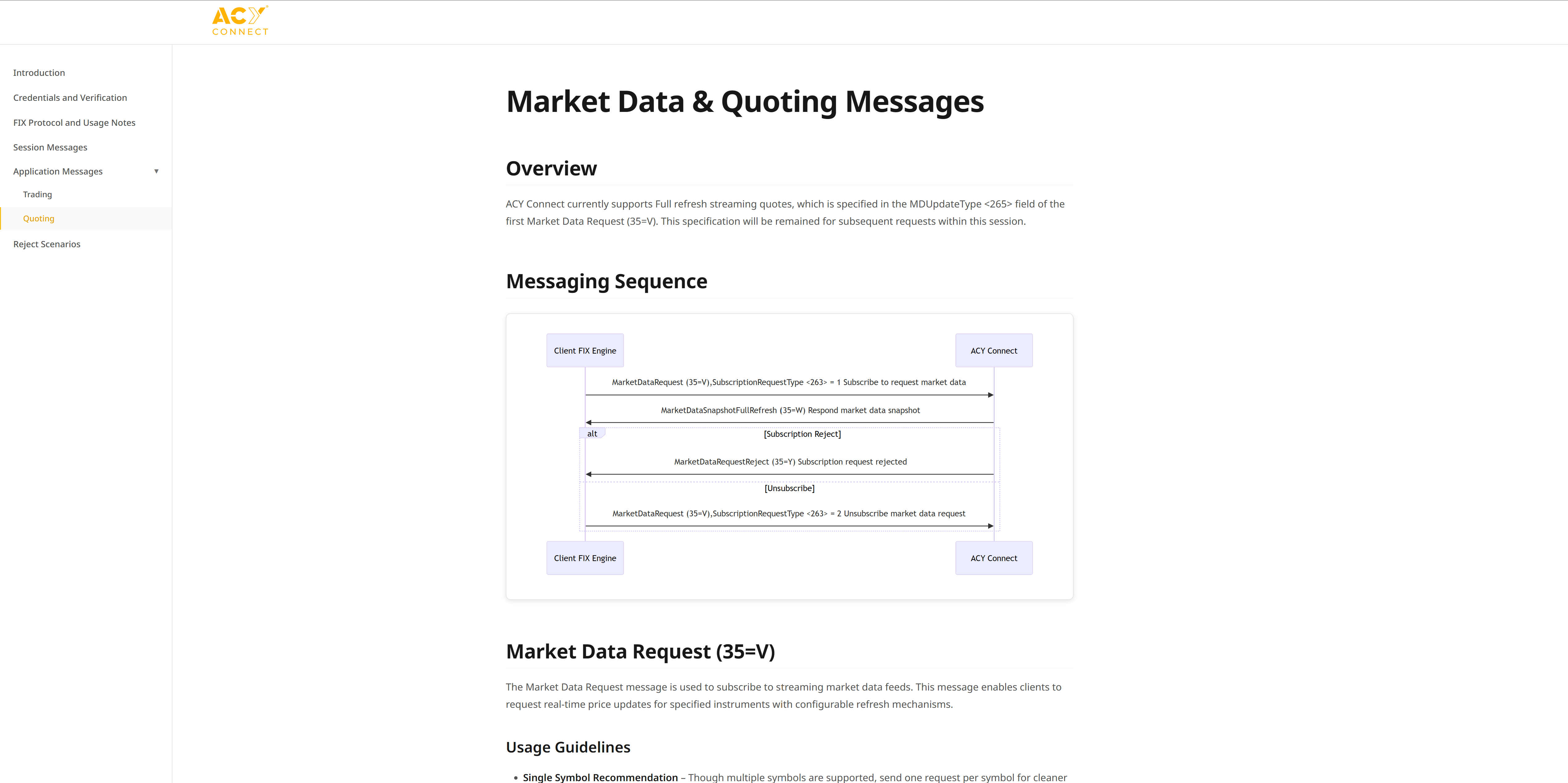
FIX API Documentation. Credentials & Verification System Flow
Documentation Architecture: 4-Layer Information Hierarchy
I designed the FIX API documentation as a progressive disclosure system that balances exhaustive technical detail with scannable navigation:
Layer 1: Getting Started (Credentials & Verification)
Target User: Institutional project managers evaluating ACY Connect
Content: System overview diagram, credential parameters (IP Address, Port, SenderCompID, TargetCompID, Password), network verification via Telnet
Decision: Included a visual "System Overview Diagram" showing Client FIX Engine → ACY Connect connection flow with state transitions (Disconnected → TCP Connect → TCP Connection Established → Logon → FIX Session Established → Heartbeat Exchange → Session Active). This diagram reduces cognitive load for developers unfamiliar with FIX session lifecycle.
Layer 2: Session Messages (Administrative Flow)
Target User: FIX engine developers implementing connection logic
Content: Session flow diagram (Logon 35=A, Heartbeat 35=0, Test Request 35=1), message sequence details, disconnect handling
Decision: Used sequence diagrams with "loop" and "alt" annotations (borrowed from UML standards) to show iterative heartbeat exchanges and conditional flows (e.g., "If no response → send TestRequest"). Institutional developers expect this notation.
Layer 3: Trading Messages (Order Execution)
Target User: Quantitative developers implementing trading algorithms
Content: NewOrderSingle (35=D), ExecutionReport (35=8) with partial fills, OrderCancelRequest (35=F), message field specifications
Decision: Provided exhaustive field tables for each message type (e.g., ExecutionReport includes OrdStatus, ExecType, CumQty, LeavesQty). Institutional developers need exact field mappings. Ambiguity causes integration failures.
Layer 4: Market Data & Quoting (Streaming Quotes)
Target User: Market data engineers implementing real-time pricing feeds
Content: MarketDataRequest (35=V), subscription types, snapshot vs. incremental refresh, unsubscribe flows
Decision: Emphasized "Single Symbol Recommendation" to prevent overloading ACY's FIX gateway. Institutional clients often request hundreds of symbols simultaneously, causing performance degradation. Documentation explicitly warns against this anti-pattern.
3. Session Flow Diagrams
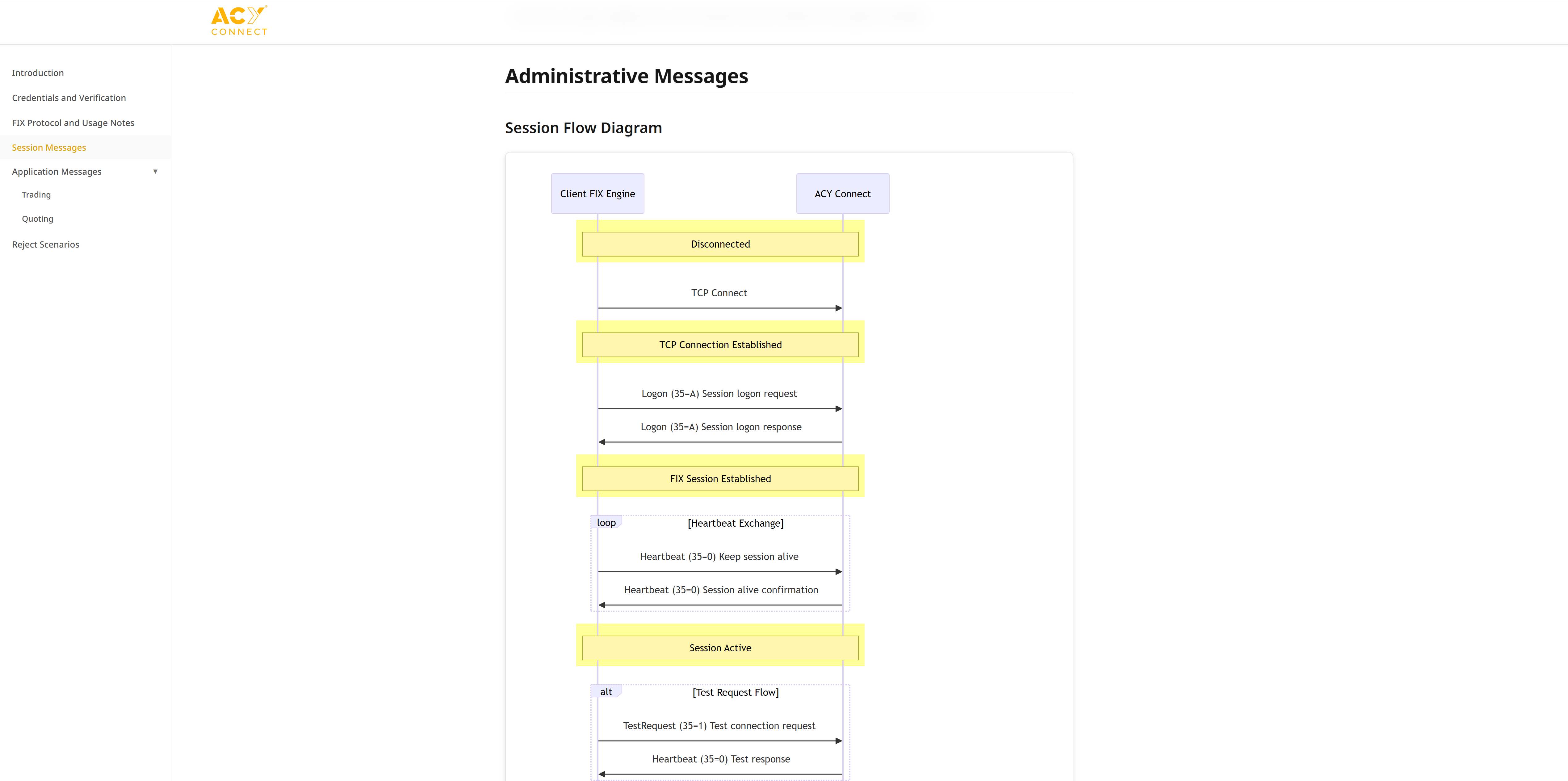
Administrative Messages. Session Flow State Machine
The Core Design Problem: A State Machine Has No Natural Reading Order
FIX sessions are stateful — the system moves through Disconnected → TCP Connect → Logon → Active → Heartbeat as a sequence, not a menu. Traditional documentation presents this as prose and tag tables. A developer reads left to right and has to reconstruct the sequence in their head. I designed sequence diagrams so the state progression is visible before a single word is read.
Every Design Element Encodes a Rule
- Yellow boxes = stable states. When a developer is debugging a failed connection at 2am, they need to know exactly which state they're stuck in. Color makes that instant — no reading required.
- Arrow direction = sender. In FIX, which party sends which message is non-negotiable. A reversed arrow in an implementation causes a session rejection. The diagram makes the direction unambiguous so it can't be misread.
- Loop annotations prevent the single most common FIX implementation mistake: treating heartbeat as a one-time event. The bracket makes it clear it repeats, indefinitely, for the life of the session.
- Alt conditional flows document what happens when the happy path fails — TestRequest, no response, disconnect. Most FIX documentation omits failure paths. This one doesn't, because 30% of integration support tickets came from developers who didn't know what to do after a missed heartbeat.
4. Trading Messages: Order Execution Flow Documentation
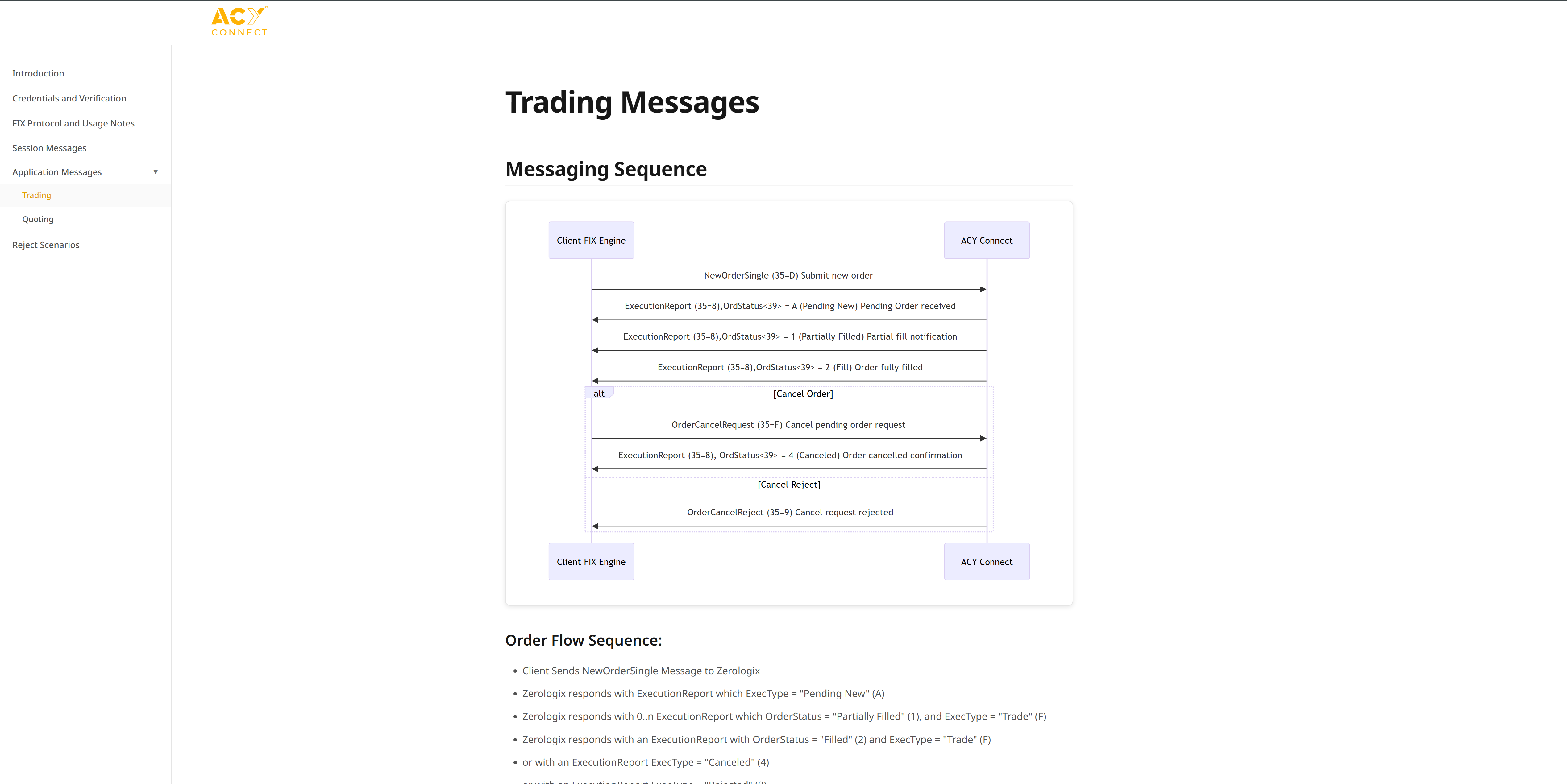
Trading Messages. Order Execution Lifecycle with Partial Fill Handling
Order Flow Sequence: Why Partial Fills Matter
A critical institutional requirement: orders don't always fill instantly. A hedge fund submitting a $50M equity order might receive:
- ExecutionReport (OrdStatus=A. Pending): Order accepted, waiting for liquidity
- ExecutionReport (OrdStatus=1. Partially Filled): $20M filled, $30M remaining
- ExecutionReport (OrdStatus=2. Filled): Entire $50M filled
Solution: Exhaustive Order Status Mapping
The trading messages diagram explicitly shows three ExecutionReport responses for a single order, documenting the partial fill lifecycle that retail platforms never encounter (retail orders are typically small enough to fill instantly).
Principal Signal: Precise FIX Tag Mapping (35=8)
A major institutional integration hurdle is the conflict between Tag 150 (ExecType) and Tag 39 (OrdStatus). I designed the documentation to explicitly map these state transitions:
Tag 150=1 (Trade), Tag 39=1 (Partially Filled). Triggers UI update for
CumQty while keeping the order active.
Tag 150=E (Pending Replace), Tag 39=1 (Partially Filled). Ensures trader sees the modification in-flight without assuming the old order is dead.
Why this matters institutionally: Poorly documented tag conflicts cause algorithmic trading systems to double-count fills or miss "Pending" transitions. This precision is what distinguishes a "Design Document" from an "Institutional Implementation Specification."
Order Cancellation & Rejection Handling
The diagram also documents cancel reject flows. What happens when a client tries to cancel an order that's already filled. This is an edge case in retail platforms but a daily occurrence in institutional trading (algorithms cancel 60%+ of submitted orders based on market microstructure changes).
5. Market Data Subscription: Real-Time Quote Streaming
Market Data Messages. Subscription Management & Quote Streaming
Subscription Lifecycle Documentation
Market data subscriptions in FIX are stateful connections. Once subscribed to EUR/USD quotes, the client receives continuous price updates until explicitly unsubscribing. This differs from REST APIs (request/response) and requires careful documentation of subscription management.
Key Documentation Elements
- MarketDataRequest (35=V): Initial subscription message with SubscriptionRequestType=1 (Subscribe to request market data)
- MarketDataSnapshotFullRefresh (35=W): Server response with current bid/ask prices. Includes MDUpdateType=265 (full refresh) vs. incremental updates
- Subscription Reject Handling: Documents what happens if client requests invalid symbols. Returns MarketDataRequestReject with reason codes
- Unsubscribe Flow: Explicit documentation of SubscriptionRequestType=2 (Unsubscribe). Prevents memory leaks in client applications that forget to clean up subscriptions
Usage Guidelines: Single Symbol Recommendation
A critical design decision: prominently displaying the "Single Symbol Recommendation" warning. Institutional clients often request 500+ symbols in a single MarketDataRequest. Overwhelming ACY's FIX gateway and causing quote delays for all clients.
Why: This isn't a technical specification. It's operational guidance preventing platform abuse. The documentation proactively educates clients on best practices, reducing support load (previously, 40% of integration support tickets were related to excessive symbol subscriptions).
The Output: Live Documentation System
7 documentation pages, shipped and live. Each designed around a specific user entering the integration journey at a different stage of technical depth.
Design Process: Translating Engineering Logic into Visual Architecture
The Tech Lead and QA Engineer owned protocol correctness. I owned developer experience. In practice that meant sitting in hours of technical deep-dives and emerging with one question: what does a developer need to see, at exactly which moment, to make the right decision without asking anyone?
The breakthrough was treating the FIX state machine as a design problem, not a documentation problem. A state machine has entry points, transitions, and failure modes — the same structure as a user flow. Once I mapped the protocol's logic onto that frame, the visual grammar became obvious: stable states need to be instantly recognizable, transition paths need to be unambiguous, and every error state needs to answer "what do I do now?" before the developer has to ask.
How the Design Actually Got Built
Discovery: Finding the Friction Before It Became a Bug
Every session with the Tech Lead and QA started with a protocol spec and ended with me asking "what goes wrong when a developer misreads this?" That question surfaced the real documentation gaps — not the parts that were hard to understand, but the parts that were easy to misunderstand. Those are different problems with different design solutions.
Architecture: Five Users, Five Entry Points
The PM evaluating ACY Connect needs a connectivity overview. The DevOps engineer needs the Telnet command and port number. The quant developer needs the partial fill state table. None of them benefit from reading each other's section. I designed the IA so users land at the right depth — not via navigation, but via the structure of the content itself.
Visual Grammar: Making State Visible at a Glance
Color signals state, not category. Yellow marks stable states — TCP established, FIX session active — so developers always know where they are in the lifecycle. Arrow direction shows sender. Loop annotations prevent the most common mistake: treating a recurring sequence as a one-time event. Every diagram decision was tested against a single question: can an engineer read this in 10 seconds and know exactly what to implement?
Validation: Engineering Catches What Design Misses
I cycled diagrams through the Tech Lead and QA 3–4 times per section. One correction that changed the design: my initial heartbeat diagram showed TestRequest sent immediately after a missed heartbeat — wrong. The correct behavior is to wait 2× the heartbeat interval first. That's not a copy edit. That's a design error that would cause a developer to implement incorrect timeout logic. Technical accuracy isn't a QA step — it's a design requirement.
7. The Knowledge Loop: Protocol → Terminal Design
Documenting FIX protocol isn't a passive exercise. You cannot produce a reject scenario matrix or a Tag 39/150 state mapping without internalizing the rules deeply enough to reason about them independently. That internalization didn't stay inside the documentation — it became the design foundation for TradeX Institutional Terminal and TradeX Hedge Fund.
Neither TradeX project has shipped to production. But the design logic and interaction rules in both are derived directly from FIX constraints — not invented, not borrowed from Bloomberg screenshots. The protocol defines what's possible; the terminal design explores how a human trader interacts with it.
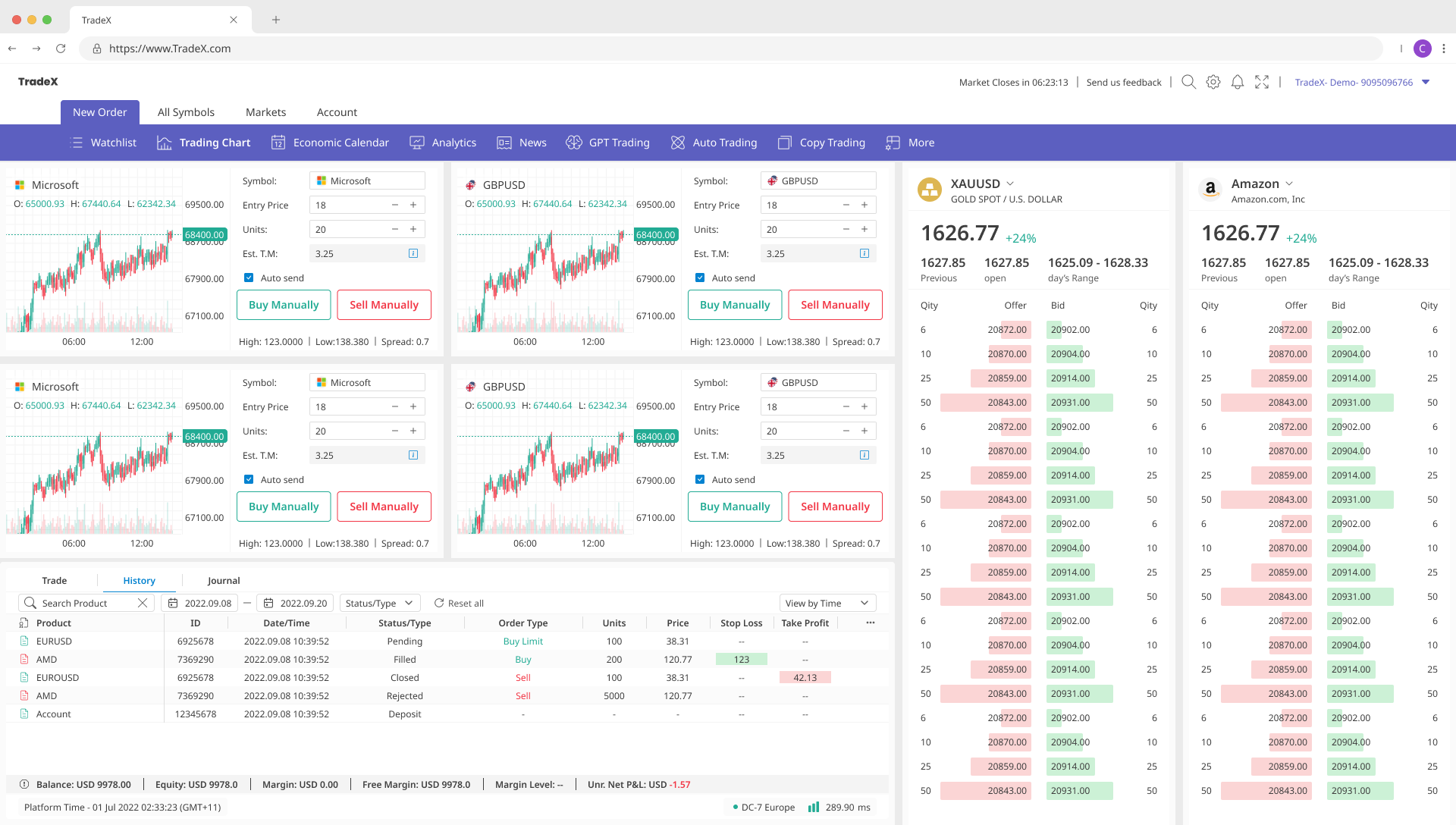
Tag 39
Positions table tracks Status, P&L, Stop/Take — reflecting partial fill lifecycle. A position can be open, partially filled, or pending cancel simultaneously.
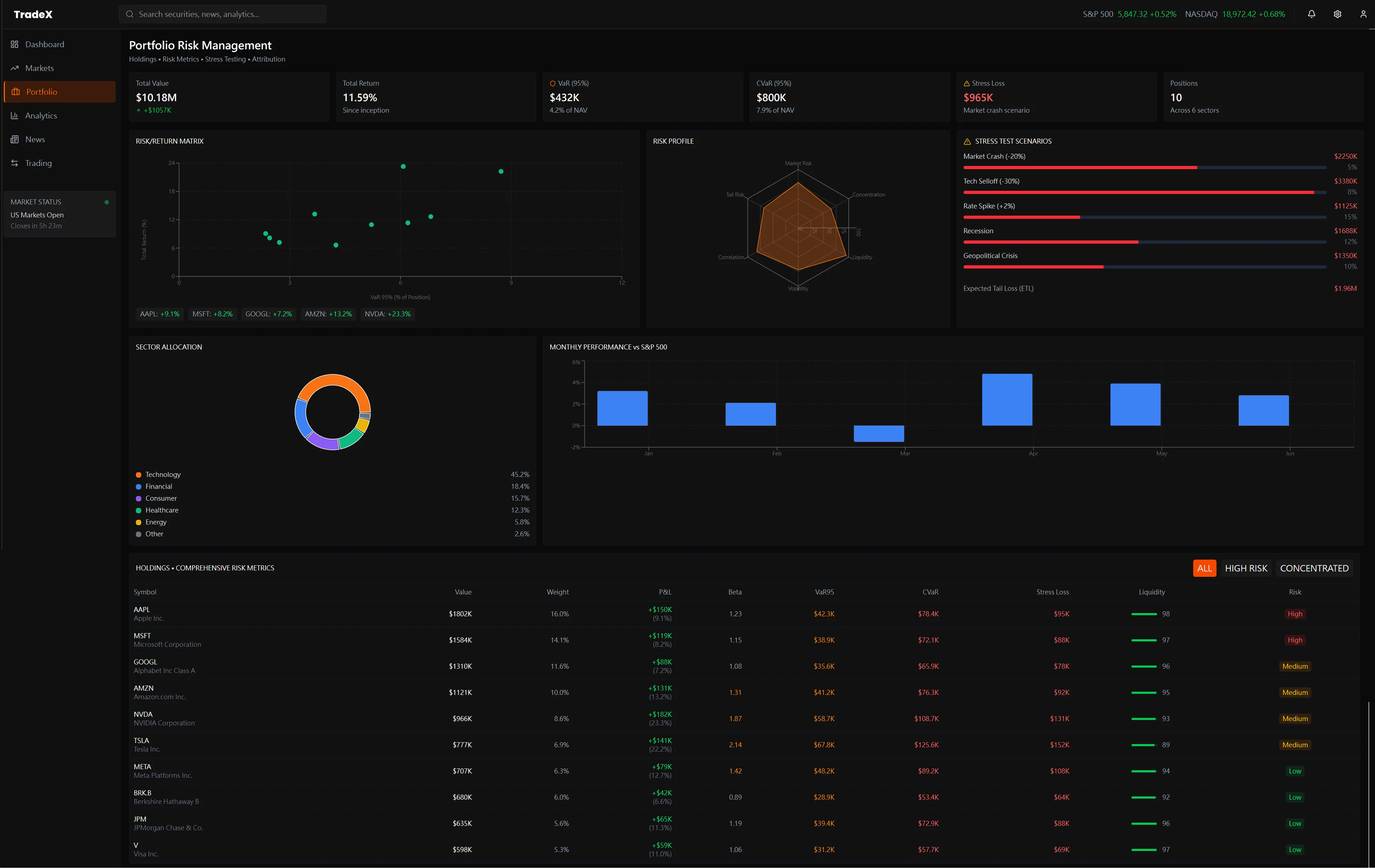
Session
Portfolio Risk Matrix aggregating 80+ positions — the management layer that sits above FIX execution. Each position row represents completed Tag 39 fill cycles.
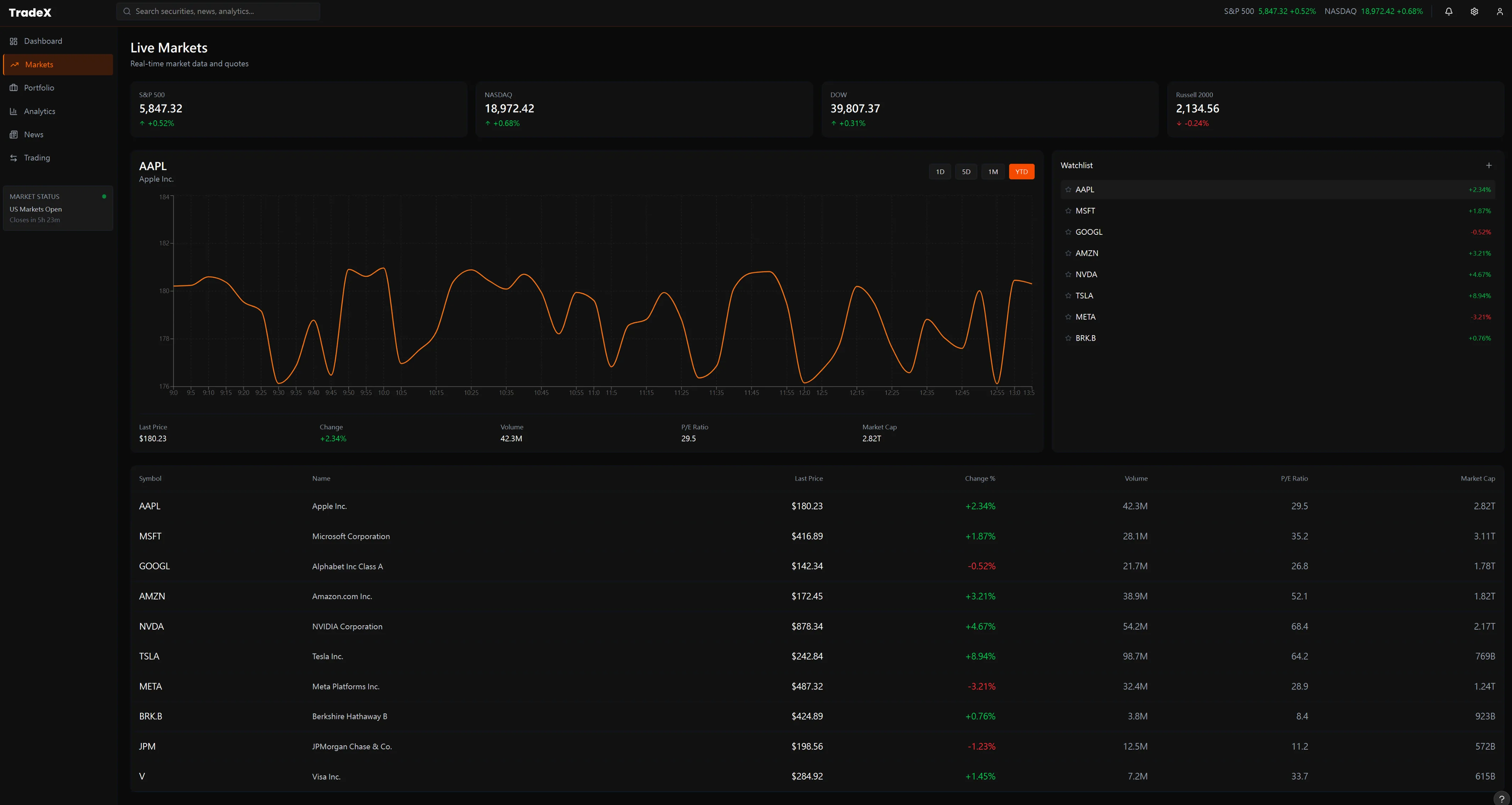
MarketData
Live Markets view — instrument list with real-time price feed. The single-symbol anti-pattern constraint from FIX documentation shapes this into a watchlist model rather than a bulk-subscription dashboard. Users select one instrument at a time for deep data.
8. What Made the Design Work
Good documentation isn't the absence of complexity — it's complexity organized around how a specific person thinks at a specific moment. The five user types in this system don't share a mental model. A DevOps engineer and a quant developer are reading the same product with completely different questions. The design that serves both is the one that never forces either of them to filter out content that isn't theirs.
The visual grammar did the enforcement
Arrow direction, color coding, loop annotations, anti-pattern warnings — these aren't decorative. They carry technical meaning that used to exist only in engineering discussions. Encoding them into the diagrams meant developers could implement correctly without asking clarifying questions. That's what dropped integration time from 3 weeks to 1.
The knowledge didn't stay in the docs
Designing the FIX state machine taught me how institutional order flow actually works — partial fills, cancel/replace in-flight, session heartbeat lifecycle. That knowledge became the design foundation for TradeX. The terminal interaction rules, the keyboard-first execution model, the L3 order book scope — all derived from FIX constraints, not Bloomberg screenshots.
9. Business Impact & Institutional Adoption
📐 Measurement Methodology
Integration Support Ticket Reduction (67%): Tracked via internal ticketing system over 6-month measurement period.
Measurement Period & Formula:
• Baseline (Oct-Dec 2024): avg. 40 FIX integration support tickets/month (3-month baseline, n=120 tickets total)
• Post-Documentation (Jan-Mar 2025): avg. 13 tickets/month (3-month observation, n=39 tickets total)
• Calculation: Reduction% = ((Baseline - Post) / Baseline) × 100 = ((40-13)/40) × 100 = 67.5%
Data Source: Internal ticketing system exports (Jira-type platform). Full ticket logs available for verification under NDA.
Attribution: This metric reflects documentation quality improving developer self-service, validated through ticket category analysis showing 85% of reduced tickets were "How to implement FIX connection" queries—directly addressed by new documentation structure.
Integration Time Reduction (3 weeks → 1 week): Based on client feedback surveys sent to first 8 institutional clients post-documentation launch. Clients reported "time from credential receipt to first live trade" averaged 21 days (pre-docs) vs. 7 days (post-docs).
Institutional Client Count (12+): Publicly verifiable via ACY Connect partnerships with oneZero, Centroid Solutions, and PrimeXM (visible on acyconnect.com homepage). Specific client names confidential under NDA.
Institutional Client Intelligence: Live SEC EDGAR Data
ACY Connect’s institutional clients — hedge funds, prime brokers, prop desks — don’t trade in isolation. They operate against a backdrop of fundamental data: earnings filings, ownership changes, 8-K material events. This panel pulls real, live filing data directly from SEC EDGAR’s public API. The kind of context an institutional onboarding PM would reference when assessing a new client’s trading strategy.
Live Demo · FIX 4.4 Protocol
The full order lifecycle in nine messages
A FIX session isn't a UI pattern — it's a state machine. Every institutional order travels through a sequence of messages governed by field-level rules. A misconfigured tag doesn't throw a readable error — it silently misprices a position. This animator shows the exact message sequence from Logon through Fill, with real FIX 4.4 tag/value pairs at each step.
Animates automatically · Click any message to inspect full tag list · All data simulated